




Key Takeaways
- Choose keywords based on user intent rather than on search volume or traffic alone.
- Check your keyword rankings in Google Search Console to see which searches bring up your pages and where you have opportunities to improve.
- Before targeting a keyword, evaluate its monthly search volume (MSV), cost-per-click (CPC), ranking difficulty, and AI Overview presence to understand its traffic potential and competitiveness.
- AI Overviews can reduce organic click-through rates (CTRs) by answering questions directly in search results. That makes traditional rankings a less reliable measure of potential traffic.
- Create useful content around related keywords that share the same search intent. Don’t try to force unrelated terms and topics onto one page.
- Improving your organic rankings can also increase your chances of being cited in Google’s AI Overviews. That gives your content another opportunity to reach potential customers.
Chances are, you want more website traffic. After all, more traffic means more business revenue, right?
Not necessarily.
More traffic’s all well and good, but attracting the wrong audience won’t do much for your bottom line. Instead, focus on improving traffic quality by targeting high-intent keywords that attract people who are more likely to buy.
Why? Consider this: The No. 1 Google search result for a given query has an average click-through rate (CTR) of 20.9 percent. Compare this with a CTR of less than 1 percent for results in spot No. 10.
Ranking first doesn’t guarantee the traffic it once did, however. The presence of a Google AI Overview in your search results is associated with a 58 percent lower average CTR for the top-ranking organic result. That’s compared to stats from just two years ago.
Despite this, ranking at the top still matters. It’s now just part of a more complex equation.
With this in mind, let’s take a look at how keyword ranking for SEO works. I’ll cover how to check your current rankings, then discuss how to choose the right keywords for your content to improve SEO keyword rankings.
What Is Keyword Ranking in SEO?
An SEO “keyword” refers to a word or phrase someone types into a search engine like Google or Bing. Ideally, the search engine will respond with results that match what the user is looking for. Your position within these results is your “keyword ranking” for the given search query.
It’s important to remember your ranking does not indicate your placement in Google’s AI Overview, however.
Here’s what current research tells us about how people search and which keywords get traffic:
- Nearly 93 percent of keywords in Ahrefs’ U.S. database are searched more than 10 times a month.
- Question-based searches increased from 8 percent in 2023 to 21 percent in 2026.
- Search queries are becoming more conversational. Three- and four-word keywords made up 48 percent of search impressions in 2026, a 15 percent increase.
Say you sell electric hand mixers and write a product category page for your products. Think about what keywords people type into Google to find your product. For example, they might search for something like “buy electric hand mixer.”
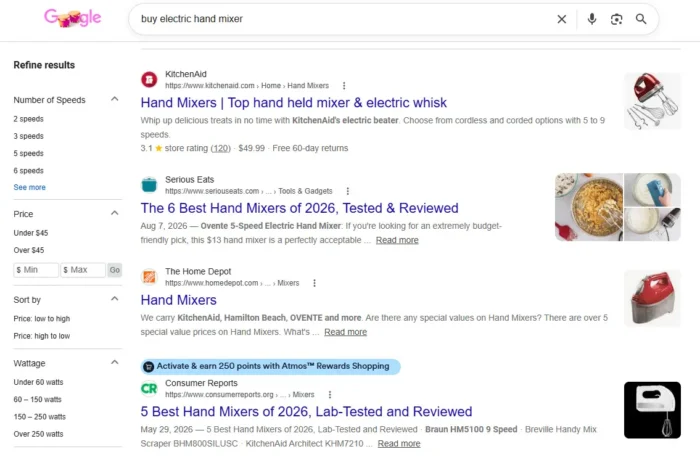
As I mentioned earlier, your SEO keyword ranking is the spot your page occupies in the list of Google search results. In this case, KitchenAid ranks above articles about the best hand mixers.
Search engine results pages (SERPs) keep changing, though. Today, these organic results often sit below product and local business listings related to this keyword. AI Overviews often display answers and explanations above organic listings.
Still, the No. 1 organic result remains the position with the most value.
SEO, or search engine optimization, involves optimizing your content using the right keywords to improve your page ranking. Let’s check out why this is important.
Why Are SEO Keyword Rankings Important?
Organic searches drive traffic. In fact, NP Digital data suggests that about 41 percent of traffic comes from organic search queries. That figure varies by industry and dataset, and some recent studies put it lower.
Even as organic search’s share of traffic declines slightly, it remains the No. 1 source for website traffic.
SOURCE: https://neilpatel.com/wp-content/uploads/2026/03/05031A_K-Traffic-Sources-Insights-What-Traffic-Sources-Make-Up-A-Websites-Traffic-Neil-Patel-by-NP-Digital-2048×1461.png
If you want to route this traffic toward your brand, you need to elevate your SEO keyword rankings.
As we’ve said, though, your goal shouldn’t be to draw just any traffic. If you want to grow your brand, you need traffic that converts.
There’s now another growing reason to pay attention to your rankings: AI searches. Pages that rank well in traditional search results are also more likely to appear in AI-generated answers for related queries. Tools like Google’s AI Overview, ChatGPT, and Perplexity pull from top-ranking pages when generating answers.
In fact, one recent study found that the top-ranking organic result was cited nearly 25 percent of the time in Google’s AI Overview. Those in the No. 10 spot? They were cited only about 10 percent of the time.
So, you want that coveted No. 1 spot for the keywords your future customers are most likely to use. To snag it, you need to be strategic about the keywords you choose and how you use them in your digital marketing campaign.
Let me walk you through the process.
Ranking for Multiple Keywords
SEO is about working smarter, not harder.
You don’t need separate pages for every keyword you want to rank for. A single page can rank for multiple related keywords, especially when these searches share the same intent.
For example, Ahrefs says that its own keyword research guide ranks for an incredible 2,100 keywords. Most of these are simple variations of the main topic, “keyword research.”
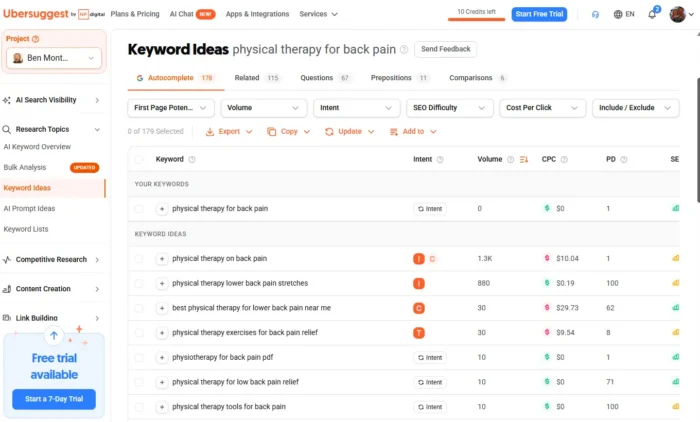
That doesn’t mean you need to target thousands of keywords yourself. Start with a primary keyword, then use Ubersuggest’s Keyword Ideas (which we discuss later) to find related terms that fit naturally into your content.
Don’t go in with the goal of squeezing in every keyword you can find. Focus instead on creating useful content that answers questions behind related searches.
Data Points to Consider When Selecting SEO Keywords
Choosing the right keywords to improve your SEO rankings isn’t easy, I know. Here are some data points to consider as you search for the most effective keywords.
Search Volume
Search volume is the number of times users search for a given keyword within a certain time period. It reveals a keyword’s popularity and competitiveness.
The higher the search volume, the greater the risk of receiving low-quality traffic.
On the flip side, focusing only on very low-volume keywords could mean less traffic to drive conversions. Keep in mind that the top three organic Google results have a combined CTR of just 34 percent.
CPC
Cost-per-click (CPC) measures how much you pay every time someone clicks a paid ad. Calculate it by dividing your advertising cost by the number of clicks your advertisement gets.
Even if you’re focused on organic search, CPC can help gauge the competitiveness of a specific keyword. A high CPC indicates strong commercial intent and a higher likelihood of conversions. If CPC is low, it might mean organic traffic conversions will also be low.
If you’re running ads, consider industry benchmarks to help determine if the costs are justified. A CPC of $9 may be justifiable when advertising legal services, for example, but it’s much too high if you’re promoting a restaurant.
SEO Difficulty
SEO difficulty scores reflect how challenging it is to rank for a particular keyword.
The lower the difficulty, the easier it is to rank for the keyword. It could also mean there’s a low search volume.
A high score means there’s heavy competition for the keyword, so you might struggle to rank against large competitors. Still, creating higher-quality content can help you outrank your competitors.
Paid Difficulty
Paid difficulty refers to how easy or hard it is to rank for a keyword in paid search results.
A high difficulty means you’ll pay more to rank for the keyword. Low-difficulty keywords are easier to rank for but may not be worth paying for.
AI Overview Presence
Before targeting a keyword, search it on Google to see if it triggers an AI Overview. If it does, it may get fewer organic clicks even if your page ranks well.
Despite this, AI Overview also creates another opportunity for visibility. If Google cites your content in AI Overview, your website has another chance to reach potential visitors, even if your page isn’t the top-ranked organic result.
Keyword tracking tools can help you identify which searches trigger AI Overviews and whether your website appears among the cited sources. Factor this into your traffic projections before investing in a keyword.
Also, remember that the higher your content ranks organically, the more likely it could appear in an AI Overview.
How to Check Your Keyword Rankings
Before you decide which keywords to target, find out where your pages already rank. You may be surprised by the keywords you rank for, even if you haven’t specifically targeted them.
Here are three ways to check.
Google Search Console
I recommend you start here. Google Search Console is free and shows how your site is performing in Google Search.
Just go to the site and click “Add property,” which allows you to connect your URL. Once you’re all set up, click “Performance > Search results” and scroll down to the “Queries” tab.
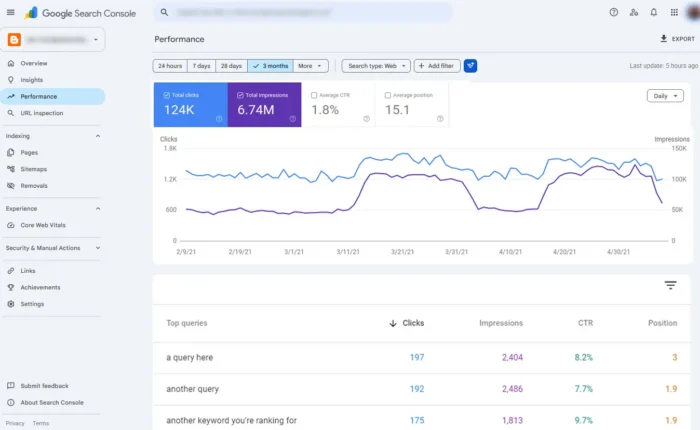
You’ll see which searches bring up your site along with impressions, clicks, CTR, and average position. Select a specific query to see how its performance changes over time.
Keep in mind that average position reflects multiple impressions, so it won’t necessarily match the ranking you see in a single search.
Third-Party SEO Tools
Tools like Ubersuggest, Ahrefs, and Semrush help you monitor rankings beyond what Search Console provides.
Ubersuggest is a good starting point for tracking your target keywords and finding related opportunities, and I’ll walk through how to use it later in this post. Ahrefs and Semrush also offer comprehensive competitor research, which can be useful for comparing your rankings with similar sites.
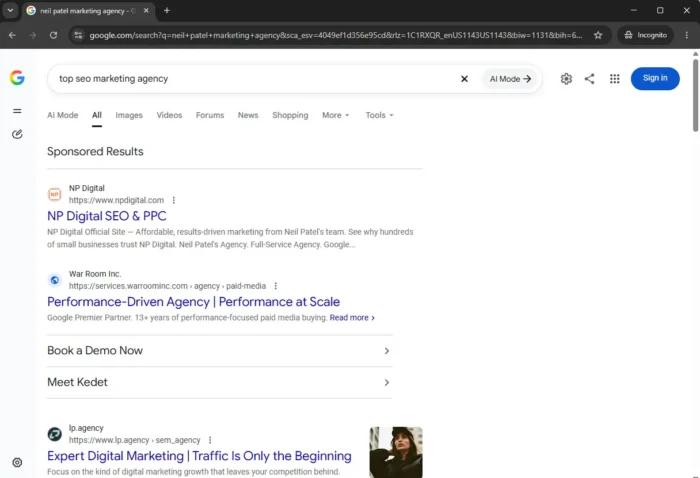
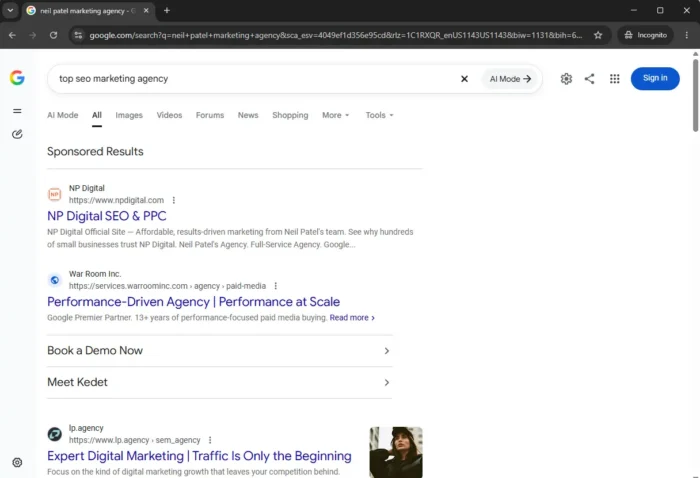
Incognito Mode
For a quick spot check, search your target keyword in a Chrome incognito window and see where your page appears.
Incognito mode limits personalization based on your browsing history, but it doesn’t eliminate differences caused by location, device, or other search settings. So just use it for a quick look, not to continually track your rankings.
Once you know where you stand, you can better identify which keywords offer the best opportunities to improve your rankings.
How to Choose Keywords That Can Get You the Top Spot
Now that you know where your site stands, here’s how to proceed with your hunt for high-quality keywords to reach your digital marketing goals.
1. Research and Compile a List of Topics to Cover
First, you need content ideas, so find out what matters most to your audience. What types of questions are they asking, and what do they need help with?
Check out platforms like Reddit, Quora, and my tool AnswerThePublic for ideas. Reddit, for example, has over 130 million active daily users, so it’s a good starting point for researching questions.
AnswerThePublic shows you questions people search for, giving you another way to identify topics worth covering.
Common questions across multiple platforms suggest it’s a topic worth exploring. Make a list of topics to cover based on these findings.
2. Plug Your Target Topics into a Tool Like Ubersuggest
Once you have some topics in mind, use Ubersuggest to find relevant keywords.
Ubersuggest shows you the most profitable keywords for your topics, so you’ll know where to focus your content. With over 250,000 users, Ubersuggest is a widely trusted keyword research tool.
Plus, it’s super easy to use.
Say you want to write about inbound marketing. Type the phrase into Ubersuggest and click Search:
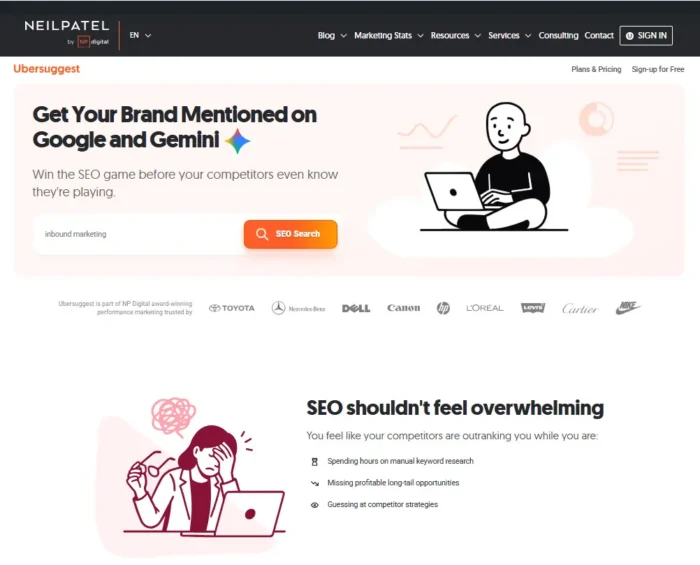
The results show the keyword’s search volume and related terms. Check the Content Ideas section to see which articles are already performing well for your top.
3. Drill Down into the Data to Find the Best Keywords for Your Topics
You have keyword ideas and maybe even some inspiration for new content. Now how do you find the right keywords for your topics?
Again, Ubersuggest can help. The Keyword Overview section reveals your chosen keyword’s CPC, search volume, and difficulty scores:
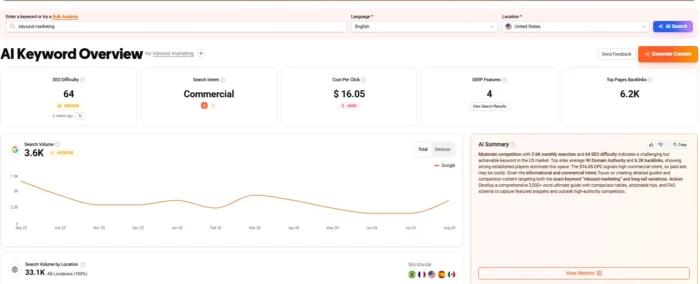
You can add this keyword to your research list by clicking “Add to List” and choosing “Add to Keyword List.” Then, scroll down to Keyword Ideas to view related keywords:
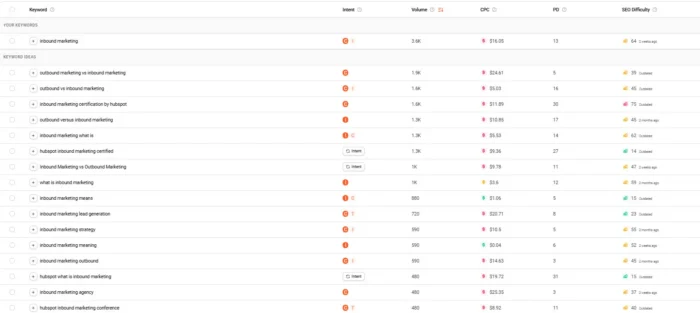
Look for keywords that match your audience’s search intent and offer a realistic opportunity to rank. Questions and longer, more specific searches can help you identify what readers want to know.
Compare your options and choose a primary keyword and related terms. Then use these to get started on your content.
Keyword Ranking SEO Tips and Best Practices
If you’re ready to take your best shot at a No. 1 ranking, here are five practical tips for boosting your SEO keyword rankings.
1. Optimize for Featured Snippets and AI Overviews
Both featured snippets and AI Overviews display as answer boxes at the top of a SERP. They’re distinctly different, though.
Featured snippets pull answers from individual webpages, while AI Overviews generate answers that often cite several sources. AI Overviews have become more common, but featured snippets still show up from time to time.
Both offer opportunities to get your organic content noticed.
Here’s an example of an AI Overview:
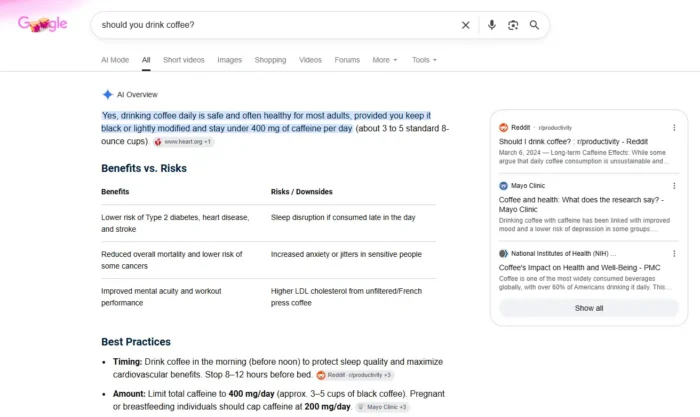
The latest data shows that 43 percent of SERPs show an AI Overview at the top of the page, while featured snippets appear only about 5 percent of the time.
Both features continue to transform SERPs, and you should know how to make them work for you.
From an SEO perspective, both features are more common for question-based keywords. Use Ubersuggest to find relevant question-based keywords, then answer those questions clearly with helpful, well-organized content.
2. Use the Primary Keyword Strategically
To get the most from your primary keyword, use it strategically throughout your website.
Always use the primary keyword in your page title and the first paragraph of your content to help Google understand what your page is about. You should also try to include your primary keyword and some keyword variations in subheadings.
Don’t overuse your keywords, though. It could be considered keyword stuffing, which can damage your SEO keyword rankings.
3. Optimize Meta Descriptions
A meta description summarizes a page’s content. When optimized, it explains what your page is about, which helps generate better-targeted traffic.
For example, Google “Neil Patel.” My homepage appears. The meta description tells people how my website will help them, so they know what to expect when they visit:
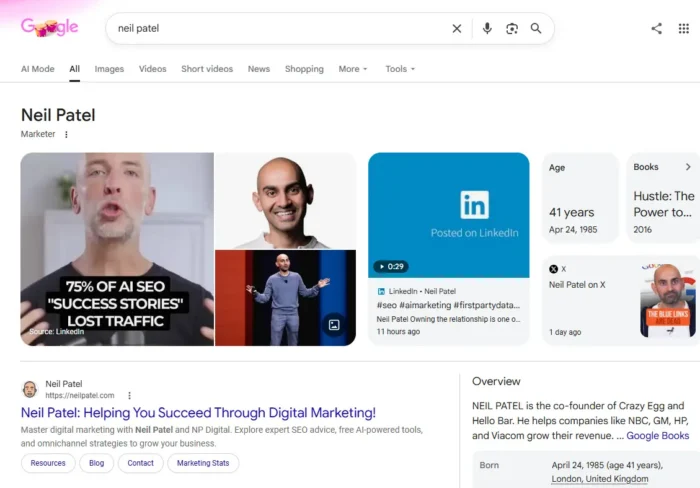
Here’s how to optimize your own meta descriptions:
- Use your primary keyword in the meta.
- Include a call to action (CTA) when you’re trying to sell the contents of the linked page (e.g., it’s for a training course).
- Keep meta descriptions between 150 and 155 characters.
4. Use Heading Tags
To help Google index your other keywords, you can build them into the outline of your content as subheadings.
Each one should have its own H2 or H3 tag.
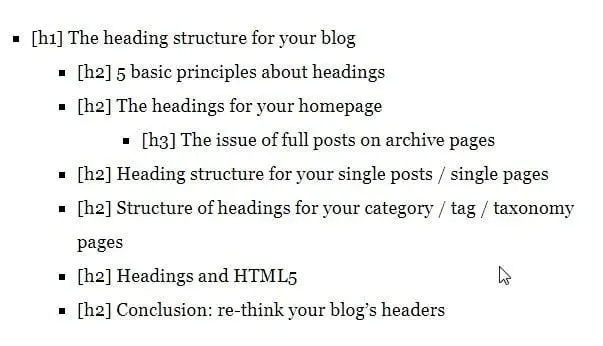
Heading tags, or H-tags, help Google’s bots and readers understand the intent of your content.
It also breaks up your long-form content for easier skimming and reading, encouraging readers to stay on the page longer.
5. Streamline Your Page Speed
For the best conversion rates, your page should load in four seconds or less, according to Portent’s research.
The digital agency discovered that for B2B websites, specifically, a site that loads in one second will have a conversion rate three times higher than one that loads in five seconds. But the impact of site speed is universal.
A slow loading time could increase your bounce rates, and poor page performance can also affect your SEO rankings. Google’s Core Web Vitals measure important aspects of the user experience, including loading speed and responsiveness. So, streamline page performance wherever possible.
To check the speed of your website, use page speed testing tools like PageSpeed Insights. Just input your URL and click Analyze to get started:

If your results aren’t optimal, try compressing images and removing unnecessary plugins that may be slowing your site. Also, cache pages to reduce load time.
6. Use Anchor Text With Keywords
Anchor text is clickable, linked text that takes users from one page to another. Ideally, it should provide some context for what the linked page is about.
Google recommends using no more than a few words for anchor text. What text should you use? Anchor text on inner pages (i.e., blog content, landing pages, and product pages) should contain keyword variations in some shape or form.
Try to use different partial match anchors throughout these inner pages to avoid keyword stuffing, and don’t compromise readability by forcing your keywords to match exactly. Keep any URL anchors concise.
FAQs
How often should I check keyword ranking to detect meaningful trends?
Review rankings regularly, using weekly or monthly views in Google Search Console to identify trends rather than reacting to daily fluctuations.
What are the most effective next steps if a target keyword ranking stalls?
Review the pages that rank above yours and look for ways to make your content more useful. Identify the questions they answer that your page doesn’t, and update your content to give readers more value. Avoid making changes solely to chase a higher position, however.
Can changes to page copy alone cause a change in keyword ranking?
Yes. Changes to your copy can affect how well your page addresses the intent and needs of those searching on Google. Rankings can change for other reasons, too. Read Google’s people-first content guide for more insight.
What should I investigate first when a keyword ranking drops unexpectedly?
First, check to see if clicks and impressions also dropped. Then investigate possible causes like technical issues, Google updates, changing search demand, or an increase in competition. Consult Google’s traffic drop troubleshooting guide for more insight.
How do I compare keyword ranking between desktop and mobile?
In Search Console’s Performance report, select your target query and use the “Device” comparison filter to compare average position and clicks.
{
“@context”: “https://schema.org”,
“@type”: “FAQPage”,
“mainEntity”: [
{
“@type”: “Question”,
“name”: “How often should I check keyword ranking to detect meaningful trends? “,
“acceptedAnswer”: {
“@type”: “Answer”,
“text”: “
Review rankings regularly, using weekly or monthly views in Google Search Console to identify trends rather than reacting to daily fluctuations.
”
}
}
, {
“@type”: “Question”,
“name”: ” What are the most effective next steps if a target keyword ranking stalls?”,
“acceptedAnswer”: {
“@type”: “Answer”,
“text”: “
Review the pages that rank above yours and look for ways to make your content more useful. Identify the questions they answer that your page doesn’t, and update your content to give readers more value. Avoid making changes solely to chase a higher position, however.
”
}
}
, {
“@type”: “Question”,
“name”: “Can changes to page copy alone cause a change in keyword ranking?”,
“acceptedAnswer”: {
“@type”: “Answer”,
“text”: “
Yes. Changes to your copy can affect how well your page addresses the intent and needs of those searching on Google. Rankings can change for other reasons, too. Read Google’s people-first content guide for more insight.
”
}
}
, {
“@type”: “Question”,
“name”: “What should I investigate first when a keyword ranking drops unexpectedly? “,
“acceptedAnswer”: {
“@type”: “Answer”,
“text”: “
First, check to see if clicks and impressions also dropped. Then investigate possible causes like technical issues, Google updates, changing search demand, or an increase in competition. Consult Google’s traffic drop troubleshooting guide for more insight.
”
}
}
, {
“@type”: “Question”,
“name”: “How do I compare keyword ranking between desktop and mobile?”,
“acceptedAnswer”: {
“@type”: “Answer”,
“text”: “
In Search Console’s Performance report, select your target query and use the “Device” comparison filter to compare average position and clicks.
”
}
}
]
}
Conclusion
If you want to rank No. 1 in a Google search, you need to target the right keywords. Otherwise, you could attract plenty of traffic without reaching the people most likely to become paying customers.
These days, improving your SEO keyword rankings can also increase your chances of being cited in AI-generated answers. This gives your content another way to attract potential customers.
No one wants to lose revenue just because they choose the wrong keywords or their content is stuck too far down the search results page. Give the SEO keyword tools I’ve suggested a try, and if you need any extra help, don’t hesitate to contact my agency for help.
